The builder
Publishing & versions
Publish
The Publish button (top-right of the builder) takes the current state of your site live. It's atomic — your visitors keep seeing the previous version until the new one is fully uploaded and indexed. You won't catch your site mid-deploy.
While you're editing, your changes are visible only to you in the builder preview. Nothing reaches the public URL until you publish.
Version history
Click the dropdown next to Publish → Version history.
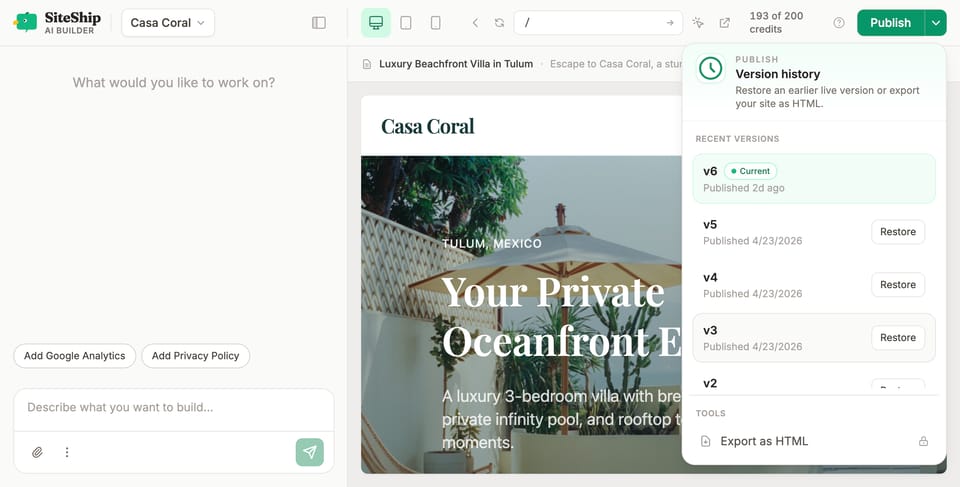
You'll see every published version with a timestamp and a one-line summary of what changed. The current live version is marked Current; older versions show a Restore button. Click Restore to roll back instantly — atomic, same as publishing forward.
We keep the last 10 published versions. Each new publish creates a new archive and the oldest one rotates out automatically — pruning happens inline during the publish itself, no separate cleanup job. Restoring an old version doesn't delete newer ones; you can always roll forward.
Export HTML
Publish dropdown → Export HTML downloads a zip of the fully rendered site (HTML, CSS, assets — everything a static host needs). Useful for:
- Archiving a snapshot.
- Migrating to another host (you can leave any time).
- Inspecting what the engine actually serves.
The export is the rendered output of your site at the time you click export.
Custom domain
Once you've published at least once to your your-slug.siteship.dev URL, you can attach a custom domain from Settings → Domain. Step-by-step: Connect a custom domain.
What gets published
The builder publishes everything in your workspace:
- Pages and templates you've edited or generated.
- Site config (name, description, menu, colors).
- Assets (images, files) you've uploaded.
- Forms, blog posts, data files, redirects.
Things that don't get published:
- Conversation history with the builder (chat is private to your account).
- Draft sections you haven't approved.
- Anything in the staging area that's still being generated.
Failed publishes
If a publish fails (rare — usually a transient hosting issue), the previous version stays live. You'll see an error in the chat panel; retry from the same Publish button. If it persists, contact support from Settings → General.