
Build a Deck Builder Website with AI

A confident trade site with your services, a project gallery and a quote request form.

~10 min Whole sites Being tested

What you need

  • SiteShip connected to ChatGPT or Claude
  • Your business details: name, address, phone, hours
  • Your own photos (optional; stock photos until then)

The prompt

Build a website for [business name], a [family-run deck and porch builder] serving [towns and area]. [Licensed and insured.] Phone [number]. Services: [custom decks (cedar, pressure-treated pine, composite), screened porches, pergolas, dock and stair repair]. [Free on-site quotes, usually within a week.] Pages: Home, Services, Our work (a gallery of [six] projects), Get a quote (name, phone, email, project type, rough size, message). Look: confident trade craftsmanship. Deep forest green and warm cedar tones on off-white, a strong condensed headline typeface, a big outdoor deck photo in the hero with the quote button prominent, project cards with large photos, and a simple three-step "how a project goes" strip.

Fill in the [brackets] with your details.

What you get

  • A four-page site: Home, Services, Our work, Get a quote
  • A project gallery ready for your own photos
  • A quote request form that emails you each lead

Good to know

  • Photos are stock until you upload your own; swap them before you go live. A gallery of stock photos is not your work.
  • Building and previewing are free; going live needs a paid plan.

An example: Marsh & Timber Decks
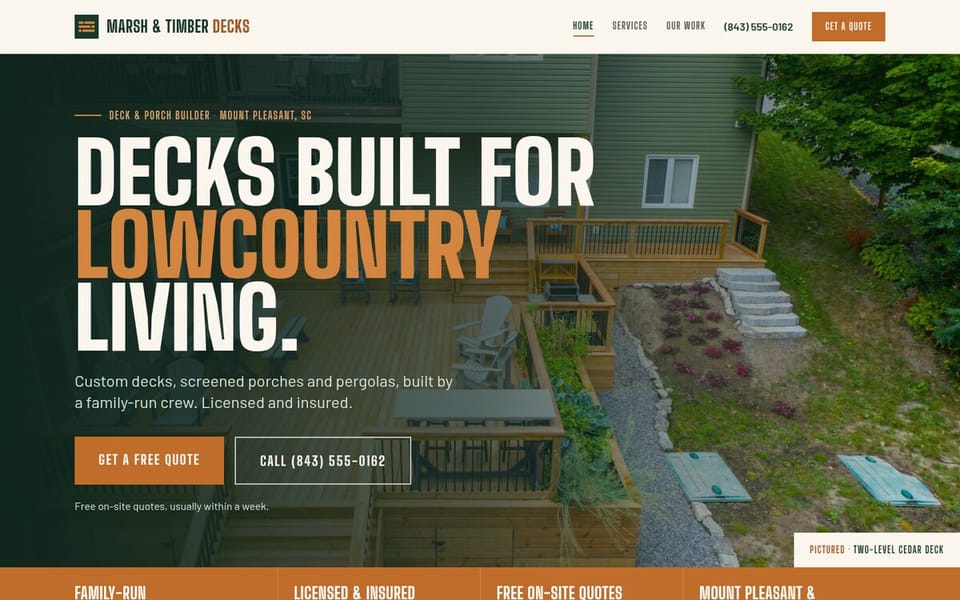
Home page of Marsh & Timber Decks, a deck builder website built with SiteShip

Not connected yet?

Built in a chat

Home page of Low Tide Coffee, a coffee shop website built with SiteShip

Coffee shop

Low Tide Coffee

The prompt that built it

Build a website for Low Tide Coffee, a small coffee shop and roastery at 14 Harbor Street, Beaufort, SC. We roast our own beans in the back room. Open every day 7am to 3pm. Phone (843) 555-0114. A menu with prices (drip, cortado, cold brew, oat-milk latte, biscuits and pastries). Two house blends sold in the shop: Marsh Blend and Dock Street Dark. Catering for offices and events, with an enquiry form (name, email, date, number of people, message). Pages: Home, Menu, Our beans, Catering. Look: warm and moody. Dark roasted brown and cream with a burnt-orange accent, an elegant serif for headlines with a clean sans for text, a photo of coffee being poured in the hero, and a menu laid out like a printed cafe menu.

Swap in your own business details. Your AI will ask five quick questions if anything is missing.

Add SiteShip to your AI

SiteShip is a connector you add once. You'll create your free account when you connect. No card needed.

https://app.siteship.ai/mcp
ChatGPT
  1. Open ChatGPT on the web and go to Settings, then Apps and connectors.
  2. Choose Add custom connector (you may need to switch on Developer mode under Advanced).
  3. Name it SiteShip, paste the address above and choose OAuth.
  4. Sign in to SiteShip when asked, then start a new chat and say: Get started with SiteShip.

Custom connectors need a paid ChatGPT plan.

Claude
Add to Claude

This opens Claude with SiteShip filled in. Click Add, sign in to SiteShip, then say: Get started with SiteShip.

Or add it by hand

  1. Open Claude and go to Customize, then Connectors.
  2. Click Add, then Add custom connector.
  3. Name it SiteShip and paste the address above.
  4. Sign in to SiteShip when asked, then start a new chat and say: Get started with SiteShip.
Grok

Go to grok.com/connectors, choose New Connector, then Custom, and paste the address above.

Gemini

In the Gemini web app, open Apps/Connectors settings, add a custom connector and paste the address above. (US accounts only for now.)

Other AI apps and coding tools
  1. Open your AI app's settings and look for Connectors, Apps, Integrations or MCP servers.
  2. Add a custom (remote) connector and paste the address above.
  3. Sign in to SiteShip when asked, then start a new chat and say: Get started with SiteShip.

Works with any app that accepts a remote MCP server, including coding tools such as Claude Code, Cursor, VS Code and Codex.

Coding tools

Claude Code

claude mcp add --transport http siteship https://app.siteship.ai/mcp

Codex

codex mcp add siteship --url https://app.siteship.ai/mcp

Then say: Get started with SiteShip.