Notes on a NovaMira Pro WordPress build — and trying the same mockup in SiteShip
I watched Rino's live stream rebuilding a Bali villa mockup in WordPress + ACF + Elementor via NovaMira Pro. As an experiment, I tried the same mockup in SiteShip — agent-driven both times. Here's what I noticed.
This morning I watched a really good live stream by Rino de Boer — he runs the Living With Pixels YouTube channel (279K subs), an Elementor and web-design educator who's been running an ongoing series for the last few months on what happens when you point AI agents at WordPress: live builds with Claude, Elementor add-on experiments, "can the agent build a real-estate site with no human in the loop?" tests. In the stream I watched, he was testing NovaMira Pro 1.1 — an MCP plug-in that lets Codex operate his entire WP install (Custom Post Types, ACF Pro fields, Elementor templates, even custom widgets when the builder falls short). He handed Codex a Bali villa-rental mockup (homepage, archive, single villa, single agent) and ran the build twice in parallel — once in Elementor (his mature stack) and once in Bricks (the experimental side). The stream ran about three hours including all the chat and explaining; the Elementor build was the stronger of the two.
It's clever engineering, the workflow is real, and the build is a strong start — call it ~70% of the way to the mockup, in my opinion.
I'd been wanting to do an honest, hands-on comparison between agent-driven WordPress and an agent-native platform for a while, so this seemed like a clean test case. I didn't rebuild the WordPress side myself — Rino had already done that on his stream. Instead, I treated his stream as one half of the experiment and ran the other half: same mockup, same agent-driven workflow, but on SiteShip.
So this post is two things at once: commentary on Rino's NovaMira Pro build, and notes from my own experiment rebuilding the same mockup in SiteShip. Both used AI agents end-to-end. Both responses to the same underlying observation — the editor of websites is becoming an agent, not a person. The question that interests me is whether you adapt the platform to the agent, or rebuild the platform around the agent.
Here's what I found.

The setup
The mockup itself was four hand-coded HTML files Rino had generated upfront — homepage, listing, one villa detail, one agent profile. ~1,400 lines of HTML, ~1,200 lines of CSS. Pretty but inert: no working filters, no real forms, no database, no admin. (Rino shared the source files for anyone who wants to try the same brief themselves.)
Rino's stack (from his live stream):
- WordPress + ACF Pro for the data layer
- Elementor Pro for the templates and visual editing
- NovaMira Pro ($200 one-time) — a WP plug-in that exposes an MCP server with built-in "skills" (technical knowledge of ACF, Elementor, JetEngine) and "abilities" (concrete admin actions)
- Codex (GPT-5.5, reasoning extra-high) as the primary agent, Claude Desktop as a fallback
- A personal instruction file Rino has spent days iterating on — workflow rules, gotchas, build order, his own opinions about what good looks like
My stack (the experiment side):
- SiteShip — files as the database, Liquid templates, file-based routing
- Tailwind v4 compiled by the engine, Alpine.js for any client-side interactivity
- Claude Code as the agent
- SiteShip's skill bundle (the platform's docs as the agent's contract —
architecture.md,data-pages.md,forms.md,blog.md, etc.) — ships with the platform, the agent loads it on every session
Both produced live, fully-routed sites — every page existed, every link worked, every form was wired. The visual fidelity to the mockup was where the two diverged: Rino's Elementor build landed at roughly mockup-shape but not mockup-pixel; mine landed closer because I was reading the exact source CSS as I went. Rino's stream ran about three hours (Elementor + Bricks built in parallel, plus all the chat, explaining, and side commentary that goes with a live stream). My run took ~2 hours across one Claude Code session.
I'm not treating Rino's time and mine as a head-to-head benchmark. He did his on a live stream while explaining what was happening — that adds overhead. I did mine quietly in a terminal with a preview tab open and a YouTube tab nearby for reference. Different conditions, different paces. The interesting comparison isn't speed — it's shape.
Where the two stacks meet
This is the most important table in the post, because most criticism of WordPress in the AI era stops here and skips the parity question. Between Rino's stream and my SiteShip experiment, both stacks demonstrably model exactly the same data shape.
| What you need to model | Rino's stack | SiteShip (this build) |
|---|---|---|
| "Post type" (Villas, Agents) | Register a CPT via NovaMira | Folder under pages/{name}/ with .md files |
| Text / number / email field | ACF Text / Number / Email | YAML scalar in frontmatter |
| Image field | ACF Image | YAML string with URL or /media/ path |
| Repeating field (Amenities list) | ACF Repeater | YAML array (amenities: [...]) |
| Gallery | ACF Gallery | YAML array of URLs |
| Choice / tag taxonomy | ACF Checkbox tied to taxonomy | tags: array — engine auto-generates /{collection}/tag/{slug} archives |
| Taxonomy with own fields (Locations with hero + intro) | Register taxonomy + ACF Term fields | data/locations.json keyed by slug, or per-term .md |
| Relationship (Villa → Agent) | ACF Post Object pointing at Agents CPT | agentSlug: field + Liquid where: lookup |
| Relationship post-to-post within the same CPT (Similar Villas) | ACF Relationship | relatedSlugs: array, or free via relatedPosts from shared tags |
| Reverse lookup (Agent → managed villas) | ACF Bidirectional plugin OR WP_Query with meta_query |
site.villas | where: "agentSlug", agent.slug |
| Numeric field with constraints (rating 0–5.0) | ACF Number with min/max | YAML number |
| Per-template dynamic data | Elementor's "dynamic tags" picker | |
| Custom render (amenities as styled grid, agent's connected properties) | Custom Elementor widget written by the agent into a sandbox | Liquid component in templates/components/ |
Every ACF + Elementor primitive maps to a SiteShip primitive. Where ACF has structured field types, we have YAML scalars and arrays. Where ACF has Relationship fields, we have slug references plus where: filters. Where Elementor has dynamic tags, we have Liquid expressions. Where the WP loop pulls a custom taxonomy archive, the SiteShip engine generates one automatically from tags: frontmatter.
So both stacks can build the site. That isn't where the divergence is.
What an entire villa looks like as a file
This is the bit that surprised me most about working agent-side. Here's the whole source for the Villa Sayan River House detail page — frontmatter that drives every section of the layout, plus a Markdown body for the long-form story:
---
title: Villa Sayan River House
slug: villa-sayan-river-house
location: Ubud
pricePerNight: 420
rating: 4.9
areaSqm: 340
bedrooms: 3
bathrooms: 3
maxGuests: 6
amenities:
  - Private pool
  - Jungle view
  - Fast WiFi
  - Outdoor shower
  - Breakfast available
  - Air conditioning
agentSlug: maya-santika
tags: [Jungle, Yoga]
image: https://images.unsplash.com/photo-1600607687920-...
gallery: [...]
locationDescription: "Sayan is a lush, quieter side of Ubud..."
---

Villa Sayan River House is a refined three-bedroom retreat tucked
into one of Ubud's most peaceful pockets. The home opens toward a
private pool, broad timber decks, and dense tropical planting...
That's the entire villa. Everything else — the detail page, the listing card, the sticky booking sidebar with the right agent's photo, the "More Ubud stays" related-villa grid, the auto-generated /villas/tag/Jungle archive — is derived from this file by the engine and the templates.
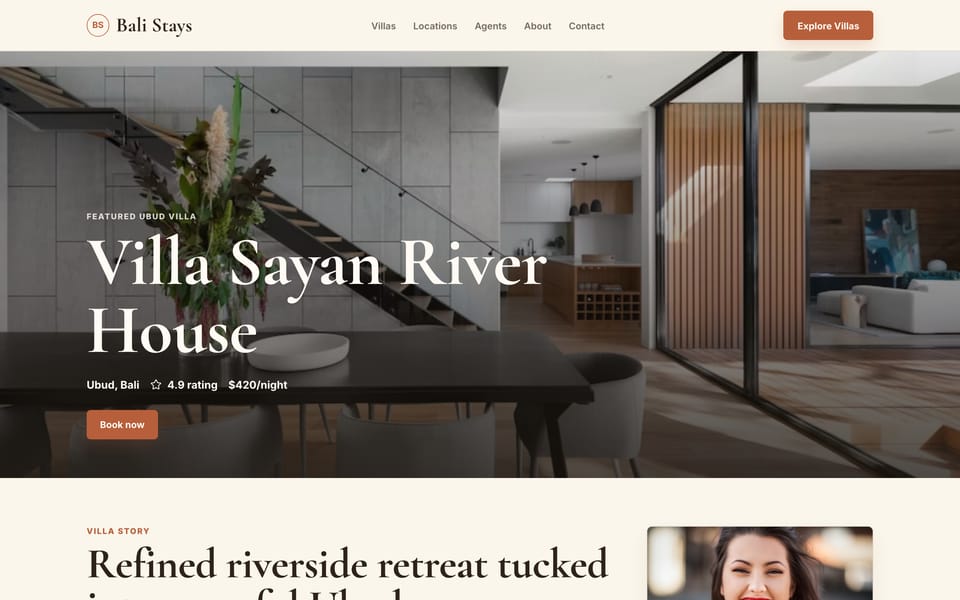
Adding a 13th villa is a single new .md file. It appears on the listing, in its location page's villa grid, in its agent's "managed properties" section, in any tag archives matching its tags:, and as the source of its own detail page — all automatically. Eleven surfaces, one file edit, zero cross-references to update.
The WordPress equivalent does the same thing — but the "single file" is spread across wp_posts (the row), wp_postmeta (the ACF fields), and the taxonomy join tables, all stitched together by the database queries the templates run. Editing it through the admin UI is fine for humans, scriptable for agents via the WP REST API or MCP. The data shape is equivalent. The substrate is not.
A quick clarifier — SiteShip is server-rendered, not a static-site generator
I want to head off a likely misread, because "files as the source of truth" pattern-matches to Jekyll, Hugo, Eleventy — pre-built static-site generators that compile the whole site to HTML files at build time and dump them on a CDN.
SiteShip isn't that. It's a server-rendered engine, conceptually closer to how WordPress works — just with very different infrastructure.
Rino's stack — WordPress request:
   Browser → Apache/Nginx → PHP → MySQL (wp_posts + wp_postmeta + terms)
                          → theme template renders DB query results → HTML
                          → (optional caching plugin sits in front)

This stack — SiteShip request:
   Browser → Cloudflare Worker (runs SiteShip engine)
                          → reads files from R2 (pages/, templates/, data/)
                          → renders Liquid template against frontmatter + data
                          → HTML, cached at edge by site version
                          → siteship push bumps the version and invalidates cache
Both are dynamic on each cache miss. Both serve the site by running code at request time against a source of truth. The difference is what the source of truth is (files in R2 vs. rows in MySQL) and what the runtime is (a JavaScript engine on a Cloudflare Worker vs. PHP-FPM on a server box). That's why the "first byte" numbers come out so different — not because SiteShip is pre-built, but because the runtime is so much smaller and closer to the user.
What we do ship statically is the source: ~36 source files in a git repo, the engine renders them at the edge. You can edit one file, push, and the next request renders fresh — same loop WordPress has, just with files where WordPress has database rows.
This matters for the comparison, because the "static site" framing tends to come with assumptions ("you can't do dynamic forms, you can't do per-visitor logic, you need to rebuild for every edit") — none of which apply here. Form submissions hit a Worker route and land in per-site SQLite. Pages can read query params at render time. Edits go live without a rebuild.
If anything, the right shorthand is: SiteShip is what WordPress would look like if you started over today, on Cloudflare, with the agent as the editor instead of the wp-admin.
Where the divergence actually is — the rulebook
If both stacks can build the same site, why pick one over the other?
The honest answer is what each path costs the agent to learn.
In Rino's stack, the agent has to learn how WordPress + ACF + Elementor + NovaMira fit together — a set of platform-specific quirks that have nothing to do with the website being built. The codified version of that knowledge is Rino's personal instruction file. He's spent days on it. It's the file he iterates on after every run, telling NovaMira to remember new mistakes. Some examples that came out of his Bali run:
- ACF Google Maps fields don't appear in Elementor's dynamic-tag picker when stored as URL. They must be a Text field instead.
- Elementor's clamp() typography requires a trailing semicolon AND "Custom Unit" set in the field, otherwise the preview is silently blank.
- ACF field widths default to 100%, so the agent must explicitly compact 2–3 short fields per row or the edit screen becomes unscrollable.
- The agent will hotlink external image URLs into ACF fields by default. Must be corrected to download + upload to the media library + link by attachment ID.
- Amenities must be a checkbox group, not a text field — otherwise the checkmark display fails in the builder.
- Bricks needs its own instruction file. Rino ran a parallel Bricks build in the same stream — it came out structurally OK (ACF foundation correct, dummy data populated) but visually weaker than the Elementor side, because the Bricks instruction file isn't as mature as the Elementor one yet.
None of this is wrong. Rino's instruction file correctly captures the realities of operating WP + ACF + Elementor at the agent level. The point is that these are all gotchas inherited from the fact that the underlying platform was designed for humans clicking through admin screens, and the agent has to compensate.
Every platform has gotchas — that's table stakes. The question is whether the platform documents them as part of its contract, or whether you, as an individual author, have to keep them in your head and pass them on to the next person who picks up the project.
Rino's own framing of this, near the end of his stream, is worth quoting directly:
"We are literally three weeks in. This was announced three or four weeks ago. This Pro version dropped today, right? And I am here complaining. It is amazing what we could do. We see a massive improvement... we're gonna get to the point in a few weeks, few months from now, where we don't have to do this work manually for most of it anymore."
He's right. The instruction-file approach gets better the longer he iterates on it. The work he's doing now is the work that'll make this entire space more agent-friendly in 6-12 months. That's real progress.
In SiteShip, the equivalent of Rino's instruction file is the skill bundle that ships with the platform — a small library of Markdown docs (architecture.md, data-pages.md, forms.md, blog.md, seo.md, etc.) that describe what files the engine expects, what frontmatter fields it reads, and what Liquid variables are in scope. Every new agent session loads them. Nothing is institutional knowledge buried in someone's notes.
That's the deepest structural difference, and it's the one that's hardest to see until you're inside both workflows:
With a bridge architecture, the agent needs to learn extra to compensate for a platform that was designed for someone else. With an AI-native platform, the platform's documentation IS the agent's contract. No translation layer.
That structural property compounds. It's why a new SiteShip session — yours, mine, anyone's — starts from the same baseline.
Where each stack wins
Here's the honest version that I'd want before choosing.
The bridge architecture (Rino's stack) is the right call when:
- The site has non-technical editors who'll use the admin UI directly. Elementor's visual canvas is a real ergonomic win when the client is a human who's never going to look at code.
- You need WordPress's plugin ecosystem — WooCommerce, MemberPress, WPForms, LearnDash. If your project is "luxury villa site PLUS booking checkout PLUS multi-tier membership PLUS LMS for the concierge team," WordPress has plug-in answers that other platforms would have to build.
- You have an existing WP shop economically — a team, a hosting setup, a maintenance contract structure. Throwing it out is expensive.
- Multi-editor permissioning matters. WordPress's user/role system handles "give the office manager content access but not theme access" out of the box.
The native architecture (SiteShip) is the right call when:
- The editing surface is going to be an agent or a developer on an ongoing basis, not a human in an admin UI.
- Performance and hosting cost matter. HTML rendered on Cloudflare Workers and cached at the edge is roughly an order of magnitude faster and cheaper than PHP-on-a-VPS, in our test renders.
- You want git history, branching, preview environments — code-shop practices applied to content.
- You want one unified system where the agent builds the custom functionality you need directly, rather than wiring together third-party plugins for every requirement. We shipped Bali Stays with zero plugins — every custom piece (forms, filters, dynamic routes, related-villa lookups, the Google Maps embed) is code the agent wrote in the engine's primitives.
- You're going to add 13 villas, then 14, then 30 — and you'd rather edit a
.mdfile than click through a CMS form thirty times.
For the kind of project at stake in our example — a brochure-style luxury rental directory, edited by an agent or developer on an ongoing basis, that needs to be fast and to look good — SiteShip is the better fit for us. For a project where five non-technical editors add content daily and the site backs a booking-payment-membership product loop, WordPress is still the better fit. The "AI revolution" hasn't deleted that distinction; it's just changed who's clicking the buttons in each.
We're working on both paths
Some context that matters here: we also run SeedProd — a WordPress page-builder and landing-page plug-in with over a million active installs. We ship WordPress products. So this isn't an outsider's "WordPress is too old" take — it's the view from inside both camps. (If you want the longer "why we built SiteShip in the first place" version, it's here.)
We're not just betting on the rebuild. We've also started WPVibe.ai — our own MCP plug-in for WordPress, live on WordPress.org and in the same lineage as NovaMira Pro. It's genuinely early days for it: the plug-in is shipping and gaining capabilities week over week, but the deeper theme-build surface (Custom Post Types, ACF fields, Elementor templates, the kind of end-to-end agent build Rino demonstrated on his stream) isn't fully scoped yet. We're adding those next. The hundreds of millions of WordPress sites in the world aren't going anywhere, and the people maintaining them deserve a first-class agent experience too — we want WPVibe.ai to be one of the best versions of that bridge.
So the way we see it:
- SiteShip is the answer for new sites where the editing surface IS the agent from day one.
- WPVibe.ai is the (still-young) answer for the millions of existing WordPress sites where switching off WP isn't on the table — but where the editor wants their agent to be more capable than clicking through wp-admin one screen at a time.
Same underlying observation about how websites are going to get built and edited from here. Two architectures, two products. We're walking both — though we're further along on one of them today, and that's honest to say.
Where this all settles
A platform's editing surface determines whether AI feels like an add-on or feels native. WordPress's editing surface is its admin UI; agents drive it through a bridge. SiteShip's editing surface is files; agents are the first-class editor from the start.
If you're going to be the primary editor of your site for the next few years, building on WordPress + a good MCP bridge is a legitimate engineering choice. Rino's workflow ships real sites, fast, today. Ours-via-WPVibe.ai is on the way.
If you're going to be delegating the editing of your site to agents — yours, ours, somebody else's — for the next few years, it's worth looking at what changes when the platform was built for that case from day one.
The Bali rebuild is up at chrome-jade-06.siteship.dev. The agent built it in an afternoon, and the entire workspace lives in a folder on my Desktop. Here's what that folder looks like:
bali-website/
├── theme.css
├── data/
│   ├── site.yaml
│   ├── agents.json              # 3 agents
│   ├── locations.json           # 4 locations
│   └── forms/
│       ├── villa-inquiry.json
│       └── agent-inquiry.json
├── templates/
│   ├── layout.html
│   ├── villas/
│   │   ├── single.html          # one template renders all 12 villa pages
│   │   └── archive.html         # /villas + auto tag archives
│   └── components/
│       ├── head.html
│       ├── header.html
│       ├── footer.html
│       ├── villa-card.html
│       ├── villa-filters.html
│       └── agent-panel.html
└── pages/
    ├── index.html               # homepage
    ├── about.html
    ├── contact.html
    ├── 404.html
    ├── villas/
    │   ├── index.html           # listing page
    │   └── *.md                 # 12 villa files, one each
    ├── locations/
    │   ├── index.html
    │   └── [slug].html          # generates 4 location pages
    └── agents/
        ├── index.html
        └── [slug].html          # generates 3 agent pages
Around 36 files. That's the whole site. No database. No PHP. No admin panel. Edit a file, push, the next request renders fresh through the engine.
Try it
Tell SiteShip what you want.
It ships.
Free to try. $20 a month to publish on your domain. Export anytime.